Email To SMS
Super easy to use Email to SMS service. No software required. Send Bulk SMS texts from your email in seconds. No set-up fees or contracts.Benefits of Email 2 SMS

- No software to install, no licensing fees to pay – ever!
- Send SMS messages without leaving your favourite email client
- Easy way for staff to send work-related SMS messages and ‘bill them to the company’
- Easy to use: manage recipients with your email contact manager, no files of contacts to upload or import
- Use it to send group broadcasts instantly
- Track all sent and received messages through your email client
- Very cost-effective and efficient compared with spending time to phone everybody manually
- Access to Australia-based customer service and technical support
- Trusted by thousands of Australian companies since 2001, from sole-traders to household-name brands
How Does It Work?
Using the trusty directSMS Email 2 SMS service, sending SMS messages is as simple as typing your message into your favourite email client (Outlook, Lotus Notes, Gmail, etc.) and pressing send.
All you need do is to send an email to @e2s.directsms.com.au. Your email will be forwarded as an SMS to the mobile number specified.
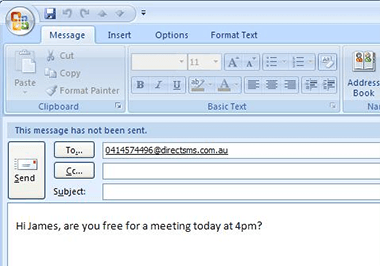
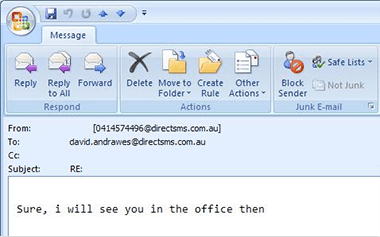
Email 2 SMS is very handy for system outage notifications or for any event where it’s more convenient to send SMS messages from the email client you use every day instead of our Web 2 SMS web-based platform.
Email 2 SMS is so smart, all replies for 2-way messages can be reliably routed back to the sender’s email inbox and mobile phone:



What About Group Messaging?
Group Email 2 SMS brings group SMS messaging to your email client. You can now send an email to group-123@e2s.directsms.com.au and directSMS will forward your email as an SMS message to all the contacts and sub-groups associated with Group #123 in your directSMS online address book. You can now keep all your contact details in one place and manage all your contact lists and groupings easily.What If I Want To Receive SMS By Email?
You can receive messages from your customers or staff on your very own dedicated Inbound SMS number with any SMS messages received will be forwarded to your Email in real time. The Inbound SMS service can even be configured to forward messages received on and reply to your customers automatically for you.Pay As You Go (Pre-paid) or Monthly Account?
Pre-paid billing is great if your usage goes up and down every month. You can buy as many or as few credits as you need. If your usage is fairly regular, then a monthly plan is the way to go. The rates are cheaper than pre-paid, you will get more features thrown in for FREE and best of all, you will pay at the end of the month rather than up front! Check out the pricing that best suits your application and estimated monthly volumes by clicking the SEE PRICING button below.Start Today!
FREE TRIAL
 IS TRUSTED BY…
 More than 8,231 Small to Large Australian Businesses and counting